Recommended Free Tools
Samsung Mobile is reader-supported. When you buy through links on our site, we may earn an affiliate commission. As an Amazon Associate I earn from qualifying purchases. Learn more
For Samsung Galaxy users who want to turn an idea, lyric, hum, or conversation into music, Suno is the strongest all-round starting point, while Soundverse AI Beat Maker is the clearest route to an instrumental you can edit. The ranking below focuses on tools that let beginners express themselves, with mobile or browser workflows that fit a Galaxy phone.
Quick Comparison For Galaxy Creators
| Rank | Tool | Free access | Paid entry | Galaxy-friendly route |
|---|---|---|---|---|
| 1 | Suno | 50 credits daily | From $8/month | Android app or web |
| 2 | Soundverse AI Beat Maker | 1,000 signup tokens | Not stated | Android app or web |
| 3 | Musicful | Free plan | Not stated | Android app or web |
| 4 | Eleven Music | 10,000 credits/month | From $6/month | Web browser |
| 5 | Loudly | 30-second generated tracks | Not stated | Web browser |
| 6 | Mureka | Free plan | From $8/month billed annually | Web browser |
| 7 | Song.do | One credit and one generation daily | From $10/month billed annually | Web browser |
| 8 | Tunee | Personal projects with attribution | Not stated | Web; iOS and macOS apps |
| 9 | OpenMusic AI | Free plan | From $10.49/month | Web browser |
| 10 | CreateSong AI | 3 credits daily; three-minute maximum | From $10/month billed annually | Web browser |
Best AI Music Tools For Everyone
1. Suno — Best Complete Starting Point
Suno is built for first-time makers as well as professionals. On a Galaxy phone, open the Android app or website, describe a genre, mood, theme, or your own lyrics, then create. It can generate vocals, lyrics, instrumentation, and production, and supports editing, remixing, extensions, section replacement, and stem export.
As an Amazon Associate I earn from qualifying purchases.
Outdated Drivers Are Slowing You Down
One free scan finds every outdated or missing driver and matches the right update for your exact hardware.Free scan · exact hardware matchPC Slower Than It Used to Be?
A free scan shows the junk files, broken settings and background clutter dragging Windows down - then fixes them in one click.Free scan · Windows 10 & 11The free plan provides 50 credits per day and allows an eight-minute audio upload; the directory also describes up to 10 free songs daily. Pro starts at $8 per month, while the Pro offer documented by Suno includes 500 songs monthly, commercial-use rights, the Song Editor, vocal and instrument stem separation, and uploads up to eight minutes. The free plan does not include commercial rights or stem separation, so confirm the current terms before releasing a track or using another person’s voice.
2. Soundverse AI Beat Maker — Best For Building A Beat From A Vibe
Soundverse is the most direct choice when your expression starts with a beat rather than a finished vocal song. Type a direction such as “dark 140bpm trap,” “dusty boom-bap,” or “festival EDM”; the tool lays out drums, bass, melody, and a mix. You can control tempo, key, and mood, then download a WAV beat with separated stems for a Galaxy editing app or desktop DAW.
Shopping ad

- Next-Gen Music Production and Beat Maker Essential - USB-powered MIDI keyboard controller with 25 mini velocity-sensitive keys, optimized for studio or beat production, piano-style performance, synth leads, sample triggering
- Real-Time Control and Navigation - 8x assignable 360° knobs, a vibrant full-color screen and push/turn encoder for hands-on access to settings, presets, and DAW functions, without reaching for a computer
- Iconic MPC Pads with RGB Feedback - 8 velocity- and pressure-sensitive MPC pads deliver an iconic finger-drumming experience, plus dynamic visual feedback to match your performance in studio or on the go
- Studio Instrument Collection Included - A powerful VST/AU and standalone virtual suite packing 1000+ pro-grade drums, keys, synths, bass, FX from AIR, Akai Pro and Moog, plus MPK Mini IV integrated controls
- Pre-Mapped DAW Integration - Get producing in under 15 minutes with Ableton Live Lite 12, Logic Pro, FL Studio and more; comes with an expanded DAW-mapped transport section for uninterrupted workflow
The free tier starts with 1,000 tokens at signup. Creator & Pro includes unlimited generations, multitrack studio access, stem export, and commercial licenses, but its price is not stated here. Soundverse says beats are royalty-ready and offers a commercial license; check the license details before monetizing a release.
3. Musicful — Best Mobile Workspace For Vocal Ideas
Musicful turns text, lyrics, or a hum into songs and also accepts uploaded audio. Its web and mobile apps stay synced, making it practical to record a melody on a Galaxy phone, revise lyrics, extend the song, and separate vocal or instrumental stems before downloading MP3 or WAV files. It supports more than 100 styles, including pop, rap, metal, K-pop, R&B, electronic, and lo-fi.
What’s actually slowing this PC down?
Pick the symptom - the matching free tool is one click away.
Musicful offers a free plan, but commercial use is limited to Standard and Pro; Free and Basic are non-commercial. A downloaded track comes with a non-exclusive perpetual license, and Musicful says it can provide a commercial licence certificate. Get consent for any uploaded voice or recording and review the plan terms before publishing.
Shopping ad

- Important Usage Note: The DMK 25 Pro MIDI keyboard is not like a piano keyboard. It does not produce sound on its own and needs to be connected to a mobile phone or computer's DAW software for use. ( 4 types of DAW software are provided)
- Smart Dynamic Scale Mode: You can play essential bass lines, melodies, and leads with ease thanks to the intelligent dynamic scale mode of DMK 25 Pro midi controller. The 16-scale tones enable you to switch between many musical genres
- Real-time Multi-Mode Control: DMK-25 Pro USB MIDI controller unleashes creativity with arpeggio, note repeat, & chord functions. Craft music clips anytime, anywhere. Enhance performance joy & explore endless playability
- Compatible with PC & Mobile Devices: DMK 25 PRO mini midi comes with a USB-C adapter. Before use, make sure the OTG adapter is compatible with the interface of your mobile device. If your interface is others(Micro USB, Lighting etc.), please purchase separately
- Personalized Touch Bar with Light Scale: Your composition is easier using Pitch/ Mod touch mode. Even at home, the touch bar with a light scale gives you the impression that you are on stage
4. Eleven Music — Best For Detailed Section Editing
Eleven Music suits creators who want to keep shaping one idea instead of regenerating an entire song. Prompt a genre, mood, instruments, and structure; then select a section and regenerate only that part, such as changing a bridge while keeping the chorus. It supports long-form composition, genre transitions, multilingual support, audio references, stems, and MP3/WAV exports. You can use a consistent voice from your own tracks or its curated Vocal Library.
The free plan includes 10,000 credits per month, and paid access starts at $6 per month. Free use is personal, while commercial rights vary by subscription tier and exclude film, television, and studio games. Use only voices you have permission to use and read the applicable subscription terms.
5. Loudly — Best For Remixing And Sharing Projects
Loudly lets you start from text, a mood, or a song formula, then refine energy, key, BPM, structure, instruments, and duration. It covers styles such as ambient, drum ‘n’ bass, EDM, hip-hop, house, lo-fi, reggaeton, synthwave, techno, trance, trap, and rock. Upload audio to remix it, export separated stems, master the result, and distribute through its web toolkit.
Shopping ad
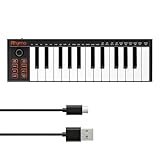
- 【Ultra-Portable USB-C MIDI Controller】Rhymo 25-key portable MIDI keyboard is slim, compact, and powered directly via USB-C from your computer or tablet. No batteries or adapters required for a truly hassle-free, on-the-go music production setup.
- 【Complete Performance & Creative Controls】Features X-Y joystick for pitch bend & modulation, arpeggiator with latch & multiple modes, loop function, tap tempo, and transpose control. Octave buttons expand up to 10-octave range for full melodic flexibility.
- 【Professional Playability Features】Equipped with Full Level mode, 16 user-selectable MIDI channels, and a 6.35mm sustain pedal interface. The velocity-sensitive keyboard delivers dynamic, expressive playing for both beginners and experienced producers.
- 【Universal DAW & System Compatibility】Class-compliant USB-MIDI and Bluetooth MIDI work with Mac, PC, iOS, and all major DAWs including GarageBand, FL Studio, Ableton Live, Logic Pro, Cubase, and more. Plug & play with no extra drivers required.
- 【Versatile I/O & Easy Operation】Includes USB-C port, 3.5mm TRS MIDI output for external synths, and clear LED indicator lights. User-friendly button layout for ARP, loop, tempo, octave, and transpose for fast, intuitive music creation.
The free plan limits generated tracks to 30 seconds. Loudly describes its original tracks as royalty-free and commercially licensed, but paid licensing rights depend on the plan, so check the current terms before a commercial release. If your upload includes someone else’s recording or voice, obtain permission first.
6. Mureka — Best For A More Studio-Like Workflow
Mureka accepts text, lyrics, styles, or reference audio and can generate, remix, extend, and edit complete tracks. Vocal generation, voice cloning, multitrack editing, stem separation, and audio/MIDI export give you several ways to turn a rough phone idea into a structured song. Its text-to-music examples include pop, jazz, electronic, and classical.
Mureka offers a free plan; the Basic Music & Speech plan is listed at $8 per month when billed annually at $96 and includes 400 songs monthly. Studio access and up to 12-stem splitting are reserved for Premier, and conversational DAW control centers on Ableton Live and Reaper. Mureka states that downloaded tracks have full commercial rights; still secure consent before cloning or incorporating a person’s voice.
Shopping ad

- Core Connectivity & Channel Capacity: Connect your gear with the classic 1-In and 1-Out MIDI-DIN ports. It handles all your musical data with ease, supporting the full 16 channels of MIDI input and output for controlling multiple instruments or multi-layered tracks
- True Plug-and-Play (No Drivers Needed): Forget complicated installation discs and driver downloads. This MIDI to USB C cable is true plug-and-play. Simply connect it to your computer, and it's ready to go, letting you focus on your creativity instead of troubleshooting software
- Universal Compatibility (USB MIDI Class Compliant) As a USB MIDI Class Compliant device, it speaks the universal language of operating systems. This means seamless integration not only with Mac and PC but also with iOS devices (like iPads) using a standard adapter—without needing special drivers
- Clean & Portable Power (USB Bus Powered) The MIDI USB cable draws all the power it needs directly from your computer's USB port. With no bulky external power supply or batteries required, it's the perfect travel companion for mobile producers and a cable-free addition to any desktop setup
- Cross-Platform Studio Compatibility Designed for versatility, this MIDI USB C cable is compatible with iOS/Android/Windows/Mac OS. Whether you are composing in a professional studio or recording on the go, it provides a stable and reliable connection for all your software
7. Song.do — Best For First-Time Vocal Song Makers
Song.do is designed for people without music theory, instrument, arrangement, recording, or lyric-writing experience. Enter text or lyrics, choose among styles such as blues, classical, rock, pop, EDM, funk, metal, jazz, rap, or instrumental, and generate a vocal or instrumental song. It can extend songs, separate vocals and instruments into stems, create lyrics videos, and download MP3/WAV files.
Do these 3 things before closing this tab:
1Repair Windows errors before they cause bigger problems2Scan for outdated or missing drivers - takes under a minute3Clear out junk files and repair common Windows errorsFree use is limited to one credit and one generation per day. Paid access starts at $10 per month billed annually, with the Starter plan listing 150 credits and 150 song generations per month. The service runs in a browser, so use a Galaxy browser; check its current rights terms before commercial use and obtain permission for any voice or source audio you provide.
8. Tunee — Best For Conversational Creativity
Tunee works like a chat partner: describe a mood, upload a reference, or share a clip, then refine the result through conversation. It creates vocal or instrumental music and supports reference uploads, stem separation, mastering, voice cloning, and model switching. The service works on the web, iOS, and macOS; on a Galaxy phone, use the web version.
Shopping ad

- Mini Keys, Major Performance - 25-key MIDI controller keyboard with responsive keys to play with feel and dynamics; Enjoy expressive songwriting, composing, jamming, playing melodies, bass lines, and more
- Full Range Experience - Play every note with ease; Use the dedicated octave up and down buttons to transpose the range of your software instruments plus a sustain button for expressive performances
- Feature Packed - Use the built-in arpeggiator and clock for creative control of any of your sound sources like software instruments, synthesizers, or USB-enabled modular gear, all by one USB cable
- Customized Production - With 8 programmable preset slots you can instantly recall your mappings for DAWs, virtual instruments, and more; Create, edit, and manage all your presets from the computer
- Versatile Performance - The USB Studio MIDI controller is perfect for your songwriting, beat-making, and DJ remixes whenever you're inspired; The sleek design fits alongside your studio equipment
The free plan supports personal projects with attribution to Tunee. Tunee says every song and video generated on the service carries a full commercial license, while its free-user terms specify personal use with attribution. Follow the exact terms for the plan you use, and clone or upload voices only with consent.
9. OpenMusic AI — Best For Music Plus Video And MIDI
OpenMusic combines prompt or lyric-based song generation with singing voices, covers, stem separation, mastering, MIDI, and video tools. It is useful when one creative idea needs a finished song for a social video: create the track, refine it, and export MP3 or WAV from the browser. The service says it supports songs and covers across all genres.
Paid access starts at $10.49 per month, and the Starter plan lists 2,400 credits per year, 1,200 music generations per year, and 1,000 download times. OpenMusic says generated tracks are royalty-free and cleared for commercial use, but plan terms govern downloads and licensing. Treat covers and uploaded voices as consent-sensitive and verify the current terms.
10. CreateSong AI — Best For Extending A Song To Eight Minutes
CreateSong AI turns prompts, lyrics, or mood notes into complete songs with vocals, structure, and polished sound in a browser. It describes human-like vocals across pop, hip-hop, rock, country, R&B, and EDM. Each extension creates two style variations, letting you add intros, verses, bridges, or endings without starting over. Paid processing creates exactly six tracks: vocals, drums, bass, other, guitar, and piano.
The free tier provides three credits per day, up to six songs per day, a three-minute maximum song length, and 30-day cloud storage; free outputs are streaming-only and public by default. Paid access starts at $10 per month billed annually, while commercial rights apply only to generations made during an annual-plan term. Ask the vendor about any voice or sample rights before release.
Quick Recap
A Simple Galaxy Workflow For Personal Expression
- Capture a starting point in Samsung Voice Recorder: a lyric, hummed melody, beat idea, or mood sentence.
- Choose a tool from the ranking based on the output you need: a complete song with Suno, an instrumental with Soundverse, mobile vocal work with Musicful, or conversational iteration with Tunee.
- Write a specific prompt naming the mood, genre, tempo or key when the tool supports those controls, instruments, vocal approach, and song sections.
- Generate several directions, then edit or extend the strongest one instead of adding unrelated instructions.
- Export stems, MIDI, MP3, or WAV only when your plan includes that format, and keep the source recording and consent notes with the project.
- Before posting to YouTube, Spotify, TikTok, or another service, check the tool’s current commercial, attribution, voice, cover, and sample terms for the plan that created the track.
Product prices and availability are accurate as of the date/time indicated and are subject to change. Any price and availability information displayed on Amazon at the time of purchase will apply.
The Tool Desk
Outbyte PC Repair FREERepair Windows errors before they cause bigger problemsFix Now →Outbyte Driver Updater FREEScan for outdated or missing drivers - takes under a minuteDriver Scan →



