Recommended Free Tools
Samsung Mobile is reader-supported. When you buy through links on our site, we may earn an affiliate commission. As an Amazon Associate I earn from qualifying purchases. Learn more
Samsung Galaxy users are increasingly leaning on the Secure Folder feature to draw a clearer line between their professional and personal lives. It is interesting, actually, because this tool was originally built for security first. Powered by Samsung Knox, Secure Folder was meant to protect sensitive files and private data. But over time, people have found another use for it, one that feels just as important. It helps keep work from quietly spilling into evenings and weekends.
Instead of buying a second phone or constantly switching profiles, many users now install office apps like Microsoft Teams, Outlook, and Slack inside Secure Folder. Once the workday ends, they simply lock the folder. With that single action, the entire work persona more or less disappears, at least until the next morning.
General shopping ads
Key Takeaways
- Secure Folder uses Samsung Knox technology to create an independent, encrypted space on Galaxy devices.
- Users can clone apps to maintain two separate accounts on one phone.
- The feature allows independent notification settings to prevent work alerts during personal time.
- It functions as a digital partition that helps reduce burnout by hiding work icons after hours.
Samsung Knox itself is a defense grade security layer built into both the hardware and software of Galaxy smartphones. Secure Folder works like a private vault within this system and requires its own password, PIN, or biometric authentication. For many professionals in India who would rather not carry two phones, this setup feels like a practical compromise. Work contacts, office emails, and even professional photo galleries can live inside the folder, completely separate from family photos, messaging apps, and social media.
Where it really starts to make a difference, though, is the Lock and Exit option. Once Secure Folder is locked, apps inside it stop pushing notifications to the main home screen. A message from your manager on a Sunday evening simply does not show up. That small detail matters more than it sounds. When you are watching a movie or sitting with family, there is no sudden reminder of pending tasks or unread emails pulling your attention away.
Shopping ad
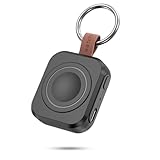
- Designed for Samsung Watch: This portable charger for Samsung Watch 8/8 Classic/7/ 7 Ultra / 6 /6 Classic / 5 / 5 Pro / 4 /3, Active 2 / Active 1 ensures seamless compatibility with new and old watches. This for Samsung galaxy watch charger can be carried around without a power source and can solve your low battery anxiety anytime.(Not for Galaxy Watch 9,Ultra 2)
- Easy Charging: Simply place the watch in the center of the charging area and press the power button to start charging immediately. The built-in magnets hold the watch in place, ensuring that the charging contacts are perfectly aligned for efficient charging. Once charging is complete, the portable galaxy watch charger can be turned off by pressing the power button twice; if no manual operation is required, the galaxy watch will automatically power off after 30s of inactivity.
- 1200mAh Battery: The portable watch charger has a built-in 1200mAh battery that can charge your watch 1-2 times. Ideal goods for traveling, exercising or extended outdoor activities.
- Compact and Portable: The 1200mAh galaxy watch ultra charger measures 5 x 4.6 x 1.5 cm (2*1.8*0.6 in), which is small enough to fit in a pocket or small purse. The watch charger comes with a keychain and eliminates the need for a charging cable, making it perfect for traveling and carrying.
- Package Includes: 1*Portable charger for samsung galaxy watch, 1*USB-C Charging Cable (1 meter), 1*Instruction Manual. It is very suitable as a Christmas gift, New Year's gift, Valentine's Day gift, Mother's Day gift, Father's Day gift, etc. to give to family and friends on special days.
As an Amazon Associate I earn from qualifying purchases.
Some users say they prefer this approach over standard Do Not Disturb modes. Do Not Disturb tends to silence everything, which can feel a bit extreme. Secure Folder, on the other hand, targets only work related tools. Personal calls still come through, and alerts from non work apps remain active, while the work partition stays quiet in the background. Setting it up is fairly straightforward too. You open Settings, head to Biometrics and Security, and tap Secure Folder to begin.
This shift in how Secure Folder is being used points to a broader need for digital boundaries. With remote and hybrid work becoming common, the physical office no longer defines work hours. Samsung Galaxy owners are, in a way, creating a virtual office inside their phones. When the day ends, they close the folder. It is a simple habit, perhaps, but one that helps keep workplace stress contained and personal time feeling genuinely personal.
Free tools Windows power users keep installed
One-click scans. No signup required.
Shopping ad

- Small & Powerful: With 25W charging power but smaller size, this Vilive Samsung charger fast charging cord is more convenient and portable. Equipped with a type c port, you can charge your device back to full power in no time by using the 25W USB C fast charger for Samsung Galaxy S26 S25 series. It takes about 1 hour to fully charge your Samsung Galaxy S26 ultra, S25 ultra, S24 ultra, S23 ultra, 3 times as fast as standard PC USB-C charger.
- Universal Compatibility: The Vilive samsung fast charger supports most of usb c devices, including Samsung Galaxy S26 Ultra/S26/S26+/S25 Ultra/S25+/S25/S24 Ultra/S24/S24+/S23 Ultra/S23/S23+/S21/ S21+/ S21 Ultra/ S22/S22+/S22 Ultra, S20/S20+/S20 Ultra/ S20, Note10/Note 20. It also charge for iPhone/Duo/ iPhone 18 Pro Max/iPhone 18 Pro/iPhone 17/iPhone 17 Pro Max/iPhone 17/16/15. Please be noted that "fast charging" is not suitable for S8/S9/S10, Galaxy Z Fold 5/Galaxy Z Flip 5/Z Flip/Z Flip3/Z Flip3 5G/Galaxy Z Fold2/Z Fold3.
- Vilive 10FT Type C Charger Fast Charging: The 25W android phone charger fast charging is equipped with extra longer 10FT(about 3 meters long) USB C fast charger cable, offering a user-friendly reversible design and longer charging distance, fast charging and up to 480 Mbps data transfer speed. The power output up to 3 Amp and 100-240 volt input of this 2pack Samsung fast chargers can charge two devices simultaneously, ideal for worldwide travel with your partner!
- Safety Assurance: The Vilive Samsung galaxy S26 S25 S24 S23 ultra super fast charger is built in intelligent chips, which can protect your devices against damage caused by short circuit, over-current, over-voltage, over-heating, and over-charging issues. Automatically stops charging when battery capacity is full to ensure your device safety and longevity.
- What's in Package: 2x 25W Vilive USB C fast charger blocks and 2x extra long 10FT(about 3 meters long) USB C fast charging cables.
Frequently Asked Questions
Q. Does using Secure Folder slow down my Samsung phone?
A. No, Secure Folder runs on the hardware level through the Knox chip. It does not noticeably affect the speed or performance of your device during regular use.
Shopping ad

- Dimmable Digital Clock - The Samsung charging station features a unique digital clock with customizable 12/24 hour formats and four adjustable brightness levels(High/Medium/Low/Off). Touch the clock display to adjust brightness. Time is saved even after power disconnection – no need to reset after unplugging. Note: No alarm function.
- Space-Saving Design - This thoughtfully designed 3-in-1 charging station with a clock eliminates excess charging cables and desktop clocks. With just one device, you can charge multiple devices simultaneously and check the time without needing to unlock your phone.
- Wide Compatibility - The watch charging area is specifically designed for Samsung Galaxy Watch Ultra/8/8 Classic/7/6/6 Classic/5/5 Pro/4/4 Classic/3/Active 1/2. The phone and earbud charging areas support all wireless charging phones and earbuds, compatible with S26 Ultra/S26+/S26/S25 Ultra/S25+/S25/S24 Ultra/S24+/S24/S23/S22/S10/Note 20/Z Flip7/Z Fold6 and iPhone 17 series, as well as Galaxy Buds series. (Note: Not for Apple Watch)
- Multiple Charging Protections - This wireless charger is made from fire-resistant materials and features multiple heat dissipation holes to aid cooling. It also includes over-voltage protection, over-current protection, overload protection, and foreign object detection for safe charging.
- Perfect for Nightstand, Office Desk, or Travel – Compact design fits any space. Place it on your bedside table for overnight charging, on your office desk for all-day power, or pack it in your bag for business trips. Clean LED indicator light is not distracting in dark rooms.
Q. Can I use two different WhatsApp accounts with Secure Folder?
A. Yes, you can install one WhatsApp account on your main home screen for personal use and a second WhatsApp account inside the Secure Folder for work. They will operate as two completely separate apps.
What’s actually slowing this PC down?
Pick the symptom - the matching free tool is one click away.
Shopping ad

- Find your things with ease: The SmartThings Find app uses Bluetooth and ultra-wideband (UWB) technology to locate and keep track of your stuff
- Water and Dust Resistant: IP67 rating offers protection against dust and water immersion between 15 cm and 1 meter for up to 30 minutes
- Compatible with Galaxy Devices Only
Q. What happens if I forget my Secure Folder password?
A. You can reset your access using your Samsung Account credentials. However, if you do not have a Samsung Account linked, you might lose the data stored inside the folder for security reasons.
Shopping ad

- REDESIGNED TO DO MORE: The redesigned Galaxy SmartTag2 is made so you can keep calm and keep track; Its design makes it easy for you to tag and carry your belongings
- EASY TO USE: It's IP67-rated water- and dust-resistant, activates your compatible IoT devices and stays powered for up to 500 days or even up to 40% more on Non-Power Saving Mode
- RELAX, YOU'VE GOT IT TAGGED: Simply register a new Galaxy SmartTag2 and get started right away with SmartThings Find; With its intuitive tracking experience, you now have a way to keep track of things you love right in the palm of your hand
- SEARCH NEAR WHEN IT'S NOT FAR: Lose something. Switch on Search Nearby and get guided instructions to your item's location via Compass View; If you still don't see it, just ring your Galaxy SmartTag2 to have it send out an audible signal
- Type of battery needed: replaceable CR2032 1 ea Lithium battery (not included)
Q. Is Secure Folder available on all Samsung phones?
A. Most mid-range and flagship Samsung Galaxy devices that support the Knox platform include Secure Folder. This includes the S-series, Note-series, and many models in the A-series and M-series.
More shopping ads
Product prices and availability are accurate as of the date/time indicated and are subject to change. Any price and availability information displayed on Amazon at the time of purchase will apply.