What’s actually slowing this PC down?
Pick the symptom - the matching free tool is one click away.
Samsung Mobile is reader-supported. When you buy through links on our site, we may earn an affiliate commission. As an Amazon Associate I earn from qualifying purchases. Learn more
Keeping your Samsung Galaxy device up to date isn’t just a good habit—it’s kind of essential. Updates bring new features, fix bugs, and, perhaps most importantly, patch up security vulnerabilities that could put your data at risk. Thankfully, the update process is pretty straightforward. Let’s walk through it together.
Why Bother Updating Your Samsung Galaxy?
There are several solid reasons to stay on top of software updates:
General shopping ads
- Security patches: These are vital. They address newly discovered threats and close loopholes that could be exploited.
- Fresh features: Samsung often sneaks in useful tools or tweaks that improve how your device works or looks.
- Performance improvements: Updates can smooth things out, speed things up, or even help with battery life.
- Bug fixes: If your phone’s been acting a little weird lately, a new update might be the solution.
Two Ways to Update Your Samsung Galaxy
You have a couple of options: updating directly on your phone (the easier route) or using a computer via Samsung’s Smart Switch software. Let’s start with the simpler method.
Method 1: Update Over-The-Air (OTA)
This is the go-to for most people, and it’s built right into your device.
Shopping ad
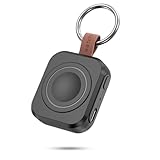
- Designed for Samsung Watch: This portable charger for Samsung Watch 8/8 Classic/7/ 7 Ultra / 6 /6 Classic / 5 / 5 Pro / 4 /3, Active 2 / Active 1 ensures seamless compatibility with new and old watches. This for Samsung galaxy watch charger can be carried around without a power source and can solve your low battery anxiety anytime.(Not for Galaxy Watch 9,Ultra 2)
- Easy Charging: Simply place the watch in the center of the charging area and press the power button to start charging immediately. The built-in magnets hold the watch in place, ensuring that the charging contacts are perfectly aligned for efficient charging. Once charging is complete, the portable galaxy watch charger can be turned off by pressing the power button twice; if no manual operation is required, the galaxy watch will automatically power off after 30s of inactivity.
- 1200mAh Battery: The portable watch charger has a built-in 1200mAh battery that can charge your watch 1-2 times. Ideal goods for traveling, exercising or extended outdoor activities.
- Compact and Portable: The 1200mAh galaxy watch ultra charger measures 5 x 4.6 x 1.5 cm (2*1.8*0.6 in), which is small enough to fit in a pocket or small purse. The watch charger comes with a keychain and eliminates the need for a charging cable, making it perfect for traveling and carrying.
- Package Includes: 1*Portable charger for samsung galaxy watch, 1*USB-C Charging Cable (1 meter), 1*Instruction Manual. It is very suitable as a Christmas gift, New Year's gift, Valentine's Day gift, Mother's Day gift, Father's Day gift, etc. to give to family and friends on special days.
As an Amazon Associate I earn from qualifying purchases.
Before You Begin:
- Battery check: Make sure you’re above 50% charge. You don’t want the phone dying mid-update.
- Connect to Wi-Fi: Updates can be large. Using Wi-Fi helps avoid data charges and is generally faster.
- Optional backup: It’s rare for things to go wrong, but backing up your data via Samsung Cloud, Google Drive, or Smart Switch is a smart move.
How to Do It:
- Open Settings: Swipe down from the top of your screen and tap the gear icon. Or just find Settings in your app list.
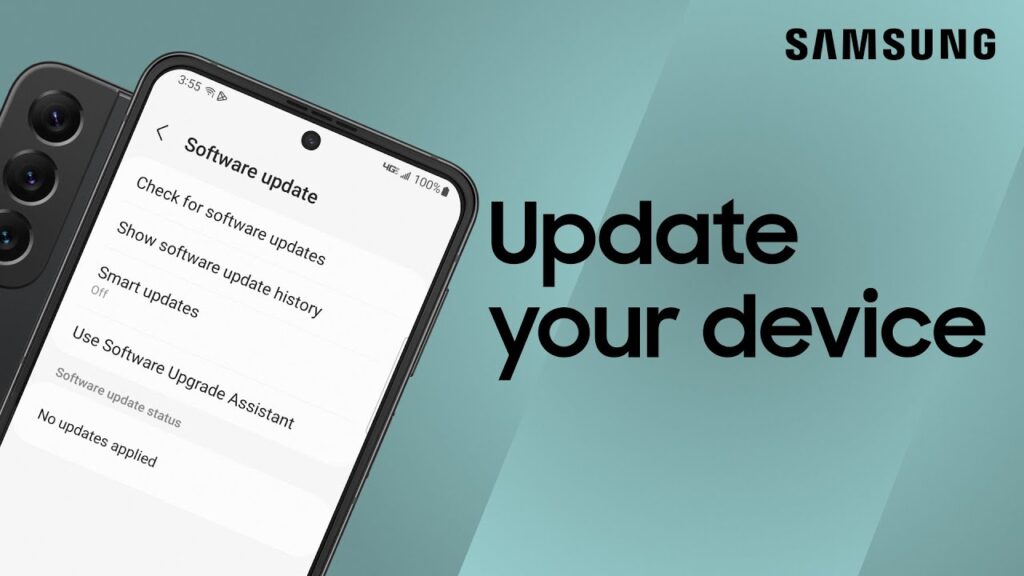
- Go to Software Update: Scroll and tap “Software update.” (Older models might show “System updates” or “About phone” > “Software information.”)
- Download and Install:
- Tap Download and install. Your phone will check for any available updates.
- If something new is found, you’ll get a summary of what’s included.
- Tap Download to grab the update.
- Once done, tap Install now. Your device will restart and begin installing—this can take a few minutes.
- Double-check: After reboot, go back to Settings > Software update to confirm you’re running the latest version.
If You Hit a Snag:
- No update available yet: Don’t stress. Samsung often releases updates in waves, so yours might be queued up.
- Slow download?: Restart your phone or Wi-Fi router.
- Update fails: Free up some space and try again.
Method 2: Update via Samsung Smart Switch (Using a Computer)
This one’s handy if OTA updates won’t cooperate, or you just prefer the feel of doing things with a keyboard and mouse.
Shopping ad

- Small & Powerful: With 25W charging power but smaller size, this Vilive Samsung charger fast charging cord is more convenient and portable. Equipped with a type c port, you can charge your device back to full power in no time by using the 25W USB C fast charger for Samsung Galaxy S26 S25 series. It takes about 1 hour to fully charge your Samsung Galaxy S26 ultra, S25 ultra, S24 ultra, S23 ultra, 3 times as fast as standard PC USB-C charger.
- Universal Compatibility: The Vilive samsung fast charger supports most of usb c devices, including Samsung Galaxy S26 Ultra/S26/S26+/S25 Ultra/S25+/S25/S24 Ultra/S24/S24+/S23 Ultra/S23/S23+/S21/ S21+/ S21 Ultra/ S22/S22+/S22 Ultra, S20/S20+/S20 Ultra/ S20, Note10/Note 20. It also charge for iPhone/Duo/ iPhone 18 Pro Max/iPhone 18 Pro/iPhone 17/iPhone 17 Pro Max/iPhone 17/16/15. Please be noted that "fast charging" is not suitable for S8/S9/S10, Galaxy Z Fold 5/Galaxy Z Flip 5/Z Flip/Z Flip3/Z Flip3 5G/Galaxy Z Fold2/Z Fold3.
- Vilive 10FT Type C Charger Fast Charging: The 25W android phone charger fast charging is equipped with extra longer 10FT(about 3 meters long) USB C fast charger cable, offering a user-friendly reversible design and longer charging distance, fast charging and up to 480 Mbps data transfer speed. The power output up to 3 Amp and 100-240 volt input of this 2pack Samsung fast chargers can charge two devices simultaneously, ideal for worldwide travel with your partner!
- Safety Assurance: The Vilive Samsung galaxy S26 S25 S24 S23 ultra super fast charger is built in intelligent chips, which can protect your devices against damage caused by short circuit, over-current, over-voltage, over-heating, and over-charging issues. Automatically stops charging when battery capacity is full to ensure your device safety and longevity.
- What's in Package: 2x 25W Vilive USB C fast charger blocks and 2x extra long 10FT(about 3 meters long) USB C fast charging cables.
Prep Work:
- Download Smart Switch: Grab it from Samsung’s official site for Windows or macOS.
- Install it: Follow the setup instructions.
- Charge up: As always, make sure your phone isn’t low on battery.
- Grab a USB cable: A good one. Preferably the one that came with your phone.
Here’s How:
- Launch Smart Switch on your computer.
- Connect your phone using the USB cable. If prompted on the phone, allow data access.
- Check for updates: Smart Switch should automatically detect your device and let you know if an update’s available.
- Click Update: Follow the prompts. The software will download and install the update.
- Don’t unplug your phone during the process.
- Once it’s done, your phone will reboot, and you’ll see a confirmation.
Troubleshooting:
- Phone not detected: Try a different cable or port. Or reinstall Smart Switch.
- Update fails: Ensure your internet is stable. Restart everything if needed.
- Post-update issues: Sometimes updates cause hiccups. You might be able to downgrade, but not always.
After the Update
Once your phone restarts and settles in, take a moment to:
- Explore new features: Peek around or check Samsung’s changelog for highlights.
- Monitor performance: Pay attention to battery life, responsiveness, etc.
- Optional: Clear the cache partition if something feels off:
- Power off your device.
- Press and hold Volume Up and Power until the Samsung logo appears.
- Use volume buttons to scroll to Wipe cache partition, press Power to select.
- Confirm, then choose Reboot system now when done.
Final Thoughts
Staying updated isn’t just about cool features—it’s about security and long-term performance. It might feel like a chore, but it’s well worth the few minutes every now and then.
More shopping ads
Shopping ad

- REDESIGNED TO DO MORE: The redesigned Galaxy SmartTag2 is made so you can keep calm and keep track; Its design makes it easy for you to tag and carry your belongings
- EASY TO USE: It's IP67-rated water- and dust-resistant, activates your compatible IoT devices and stays powered for up to 500 days or even up to 40% more on Non-Power Saving Mode
- RELAX, YOU'VE GOT IT TAGGED: Simply register a new Galaxy SmartTag2 and get started right away with SmartThings Find; With its intuitive tracking experience, you now have a way to keep track of things you love right in the palm of your hand
- SEARCH NEAR WHEN IT'S NOT FAR: Lose something. Switch on Search Nearby and get guided instructions to your item's location via Compass View; If you still don't see it, just ring your Galaxy SmartTag2 to have it send out an audible signal
- Type of battery needed: replaceable CR2032 1 ea Lithium battery (not included)
Shopping ad

- Find your things with ease: The SmartThings Find app uses Bluetooth and ultra-wideband (UWB) technology to locate and keep track of your stuff
- Water and Dust Resistant: IP67 rating offers protection against dust and water immersion between 15 cm and 1 meter for up to 30 minutes
- Compatible with Galaxy Devices Only
Shopping ad

- Dimmable Digital Clock - The Samsung charging station features a unique digital clock with customizable 12/24 hour formats and four adjustable brightness levels(High/Medium/Low/Off). Touch the clock display to adjust brightness. Time is saved even after power disconnection – no need to reset after unplugging. Note: No alarm function.
- Space-Saving Design - This thoughtfully designed 3-in-1 charging station with a clock eliminates excess charging cables and desktop clocks. With just one device, you can charge multiple devices simultaneously and check the time without needing to unlock your phone.
- Wide Compatibility - The watch charging area is specifically designed for Samsung Galaxy Watch Ultra/8/8 Classic/7/6/6 Classic/5/5 Pro/4/4 Classic/3/Active 1/2. The phone and earbud charging areas support all wireless charging phones and earbuds, compatible with S26 Ultra/S26+/S26/S25 Ultra/S25+/S25/S24 Ultra/S24+/S24/S23/S22/S10/Note 20/Z Flip7/Z Fold6 and iPhone 17 series, as well as Galaxy Buds series. (Note: Not for Apple Watch)
- Multiple Charging Protections - This wireless charger is made from fire-resistant materials and features multiple heat dissipation holes to aid cooling. It also includes over-voltage protection, over-current protection, overload protection, and foreign object detection for safe charging.
- Perfect for Nightstand, Office Desk, or Travel – Compact design fits any space. Place it on your bedside table for overnight charging, on your office desk for all-day power, or pack it in your bag for business trips. Clean LED indicator light is not distracting in dark rooms.
Product prices and availability are accurate as of the date/time indicated and are subject to change. Any price and availability information displayed on Amazon at the time of purchase will apply.
Independent reader supportYour contribution helps us test, update, and keep practical guides available for everyone.