Samsung Mobile is reader-supported. When you buy through links on our site, we may earn an affiliate commission. As an Amazon Associate I earn from qualifying purchases. Learn more
Your Samsung Galaxy phone isn’t just a way to text friends or scroll through apps. It’s also, arguably, one of the most powerful cameras you carry around every day. And while it does a great job right out of the box, there are a few things—some small, some game-changing—that can take your photography to the next level. This guide walks you through tips, tricks, and lesser-known features to help you get the most from your Galaxy camera.
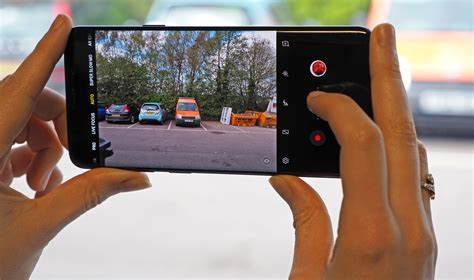
- Understand Your Camera Modes
Before anything else, get familiar with what your camera offers. Each mode is designed with a specific purpose in mind, and knowing when to switch can make a big difference.
General shopping ads
- Photo Mode (Default): This is your go-to mode for everyday shots. It’s smart, automatic, and usually does a solid job on its own. The AI adjusts things behind the scenes so you can focus on framing.
- Portrait Mode: Want that artsy blurred background? Portrait Mode is perfect for highlighting your subject.
- How to use: Just switch to Portrait, line up your shot, and tap the shutter. Afterward, you can even tweak the blur in your Gallery.
- Pro Mode: This one’s for when you want full control. You can adjust ISO, shutter speed, white balance, and more.
- When to use: Low-light scenes, creative effects, or anytime auto just won’t cut it.
- Tip: Start simple. Try lowering the ISO in bright light or slowing the shutter for cool effects like motion blur.
- Night Mode: Built specifically for low-light situations. It takes several frames and merges them into one brighter, clearer image.
- How to use: Turn it on, hold still (a tripod helps!), and let it do its thing.
- Food Mode: It boosts color and detail to make your dishes look extra appetizing, often adding a slight vignette for drama.
- Panorama Mode: For those epic, sweeping shots—whether it’s a city skyline or mountain view.
- Slow Motion/Hyperlapse: Great for dramatic or fast-paced video. Use Slow Motion to emphasize moments and Hyperlapse for sped-up sequences.
- Master the Basics of Composition
Even the most high-tech camera can’t fix poor composition. Here’s where your eye really matters:
Outdated Drivers Are Slowing You Down
One free scan finds every outdated or missing driver and matches the right update for your exact hardware.Free scan · exact hardware matchWindows Errors? Fix Them Before They Spread
Repair common Windows errors and clear accumulated junk for a smoother, more stable PC - no reinstall needed.Free scan · no reinstall- Rule of Thirds: Mentally (or literally) divide your screen into nine parts. Try placing your subject where the lines intersect—it makes photos more balanced.
- Enable grid lines: Go to Camera Settings > Grid lines.
- Leading Lines: Use things like roads or fences to guide the viewer’s eye toward your subject.
- Symmetry: Reflections, patterns, or architecture can add pleasing balance to your shots.
- Framing: Shoot through a window, doorway, or between objects to naturally draw focus to your subject.
- Get Closer: It’s surprisingly common to stay too far back. Fill the frame and let your subject really shine.
- Leverage Essential Camera Settings
Dig a bit deeper into your settings menu—there’s gold in there.
Shopping ad
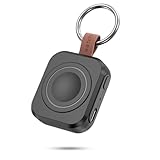
- Designed for Samsung Watch: This portable charger for Samsung Watch 8/8 Classic/7/ 7 Ultra / 6 /6 Classic / 5 / 5 Pro / 4 /3, Active 2 / Active 1 ensures seamless compatibility with new and old watches. This for Samsung galaxy watch charger can be carried around without a power source and can solve your low battery anxiety anytime.(Not for Galaxy Watch 9,Ultra 2)
- Easy Charging: Simply place the watch in the center of the charging area and press the power button to start charging immediately. The built-in magnets hold the watch in place, ensuring that the charging contacts are perfectly aligned for efficient charging. Once charging is complete, the portable galaxy watch charger can be turned off by pressing the power button twice; if no manual operation is required, the galaxy watch will automatically power off after 30s of inactivity.
- 1200mAh Battery: The portable watch charger has a built-in 1200mAh battery that can charge your watch 1-2 times. Ideal goods for traveling, exercising or extended outdoor activities.
- Compact and Portable: The 1200mAh galaxy watch ultra charger measures 5 x 4.6 x 1.5 cm (2*1.8*0.6 in), which is small enough to fit in a pocket or small purse. The watch charger comes with a keychain and eliminates the need for a charging cable, making it perfect for traveling and carrying.
- Package Includes: 1*Portable charger for samsung galaxy watch, 1*USB-C Charging Cable (1 meter), 1*Instruction Manual. It is very suitable as a Christmas gift, New Year's gift, Valentine's Day gift, Mother's Day gift, Father's Day gift, etc. to give to family and friends on special days.
As an Amazon Associate I earn from qualifying purchases.
- Resolution & Aspect Ratio: The highest resolution captures the most detail, but your aspect ratio matters too. 3:4 is flexible for cropping, while 9:16 is great for stories or video.
- Adjust it: Tap the aspect ratio icon in Photo mode.
- High-Efficiency Pictures (HEIF/HEIC): Saves space while keeping quality. Just be cautious—some apps or devices might not support it.
- Enable it: Camera Settings > Save options.
- Scene Optimizer: AI-powered adjustments based on what it detects—from pets to sunsets.
- Enable it: Camera Settings > Scene optimizer.
- Shot Suggestions: This gives on-screen cues to help you frame shots better.
- Enable it: Camera Settings > Shot suggestions.
- Tracking Auto-Focus: Keeps your subject sharp, even when they move.
- Enable it: Camera Settings > Tracking auto-focus.
- HDR (High Dynamic Range): Balances bright and dark areas in high-contrast scenes.
- Enable it: Tap the “HDR” icon or find it in Settings.
- Utilize Pro Mode for Advanced Control
If you’re feeling adventurous or have a specific vision in mind, Pro Mode is your playground:
- ISO: Controls light sensitivity.
- Low ISO (50-200) = Bright light, crisp image
- High ISO (400+) = Low light, more noise
- Shutter Speed: Affects motion.
- Fast (1/500s+) = Freeze action
- Slow (1/30s or slower) = Motion blur
- White Balance: Adjusts how colors appear based on lighting.
- Use presets or tweak by temperature (Kelvin scale)
- Manual Focus: Helpful for close-ups or when auto-focus struggles.
- Exposure Compensation (EV): Nudge your photo brighter or darker with simple +/- adjustments.
- Post-Processing: The Final Touch
Editing can be where good photos become great ones. And you don’t need a separate app—your phone has tools built-in.
What’s actually slowing this PC down?
Pick the symptom - the matching free tool is one click away.
Shopping ad

- Small & Powerful: With 25W charging power but smaller size, this Vilive Samsung charger fast charging cord is more convenient and portable. Equipped with a type c port, you can charge your device back to full power in no time by using the 25W USB C fast charger for Samsung Galaxy S26 S25 series. It takes about 1 hour to fully charge your Samsung Galaxy S26 ultra, S25 ultra, S24 ultra, S23 ultra, 3 times as fast as standard PC USB-C charger.
- Universal Compatibility: The Vilive samsung fast charger supports most of usb c devices, including Samsung Galaxy S26 Ultra/S26/S26+/S25 Ultra/S25+/S25/S24 Ultra/S24/S24+/S23 Ultra/S23/S23+/S21/ S21+/ S21 Ultra/ S22/S22+/S22 Ultra, S20/S20+/S20 Ultra/ S20, Note10/Note 20. It also charge for iPhone/Duo/ iPhone 18 Pro Max/iPhone 18 Pro/iPhone 17/iPhone 17 Pro Max/iPhone 17/16/15. Please be noted that "fast charging" is not suitable for S8/S9/S10, Galaxy Z Fold 5/Galaxy Z Flip 5/Z Flip/Z Flip3/Z Flip3 5G/Galaxy Z Fold2/Z Fold3.
- Vilive 10FT Type C Charger Fast Charging: The 25W android phone charger fast charging is equipped with extra longer 10FT(about 3 meters long) USB C fast charger cable, offering a user-friendly reversible design and longer charging distance, fast charging and up to 480 Mbps data transfer speed. The power output up to 3 Amp and 100-240 volt input of this 2pack Samsung fast chargers can charge two devices simultaneously, ideal for worldwide travel with your partner!
- Safety Assurance: The Vilive Samsung galaxy S26 S25 S24 S23 ultra super fast charger is built in intelligent chips, which can protect your devices against damage caused by short circuit, over-current, over-voltage, over-heating, and over-charging issues. Automatically stops charging when battery capacity is full to ensure your device safety and longevity.
- What's in Package: 2x 25W Vilive USB C fast charger blocks and 2x extra long 10FT(about 3 meters long) USB C fast charging cables.
- Basic Adjustments: Tap the edit icon in Gallery. Tweak brightness, contrast, and more.
- Crop & Straighten: Fix that slightly off-kilter shot or improve the overall frame.
- Filters: Use with restraint. Subtlety often works best.
- Spot Healing & Object Eraser: Clean up blemishes or distractions, especially handy with newer Galaxy models.
- Practical Tips for Everyday Photography
Sometimes, it’s the little things that make all the difference:
- Clean Your Lens: A quick wipe with a soft cloth can drastically improve clarity.
- Light is Everything: Aim for natural light. Golden hour (just after sunrise or before sunset) gives that magical glow.
- Skip Digital Zoom: It just crops the image. If you don’t have optical zoom, it’s better to crop later.
- Use Volume Button as Shutter: Helps stabilize your shot.
- Hold Steady: Brace yourself or use a tripod, especially in low light.
- Play With Angles: Don’t be afraid to crouch down or shoot from above.
- Take Multiple Shots: Slight variations can make a big difference. Pick your favorite later.
At the end of the day, the best way to improve is to experiment. Try different modes, angles, and settings. Review what works (and what doesn’t). Most importantly, keep it fun—because when you enjoy the process, great photos follow.
More shopping ads
Shopping ad

- REDESIGNED TO DO MORE: The redesigned Galaxy SmartTag2 is made so you can keep calm and keep track; Its design makes it easy for you to tag and carry your belongings
- EASY TO USE: It's IP67-rated water- and dust-resistant, activates your compatible IoT devices and stays powered for up to 500 days or even up to 40% more on Non-Power Saving Mode
- RELAX, YOU'VE GOT IT TAGGED: Simply register a new Galaxy SmartTag2 and get started right away with SmartThings Find; With its intuitive tracking experience, you now have a way to keep track of things you love right in the palm of your hand
- SEARCH NEAR WHEN IT'S NOT FAR: Lose something. Switch on Search Nearby and get guided instructions to your item's location via Compass View; If you still don't see it, just ring your Galaxy SmartTag2 to have it send out an audible signal
- Type of battery needed: replaceable CR2032 1 ea Lithium battery (not included)
Shopping ad

- Find your things with ease: The SmartThings Find app uses Bluetooth and ultra-wideband (UWB) technology to locate and keep track of your stuff
- Water and Dust Resistant: IP67 rating offers protection against dust and water immersion between 15 cm and 1 meter for up to 30 minutes
- Compatible with Galaxy Devices Only
Shopping ad

- Dimmable Digital Clock - The Samsung charging station features a unique digital clock with customizable 12/24 hour formats and four adjustable brightness levels(High/Medium/Low/Off). Touch the clock display to adjust brightness. Time is saved even after power disconnection – no need to reset after unplugging. Note: No alarm function.
- Space-Saving Design - This thoughtfully designed 3-in-1 charging station with a clock eliminates excess charging cables and desktop clocks. With just one device, you can charge multiple devices simultaneously and check the time without needing to unlock your phone.
- Wide Compatibility - The watch charging area is specifically designed for Samsung Galaxy Watch Ultra/8/8 Classic/7/6/6 Classic/5/5 Pro/4/4 Classic/3/Active 1/2. The phone and earbud charging areas support all wireless charging phones and earbuds, compatible with S26 Ultra/S26+/S26/S25 Ultra/S25+/S25/S24 Ultra/S24+/S24/S23/S22/S10/Note 20/Z Flip7/Z Fold6 and iPhone 17 series, as well as Galaxy Buds series. (Note: Not for Apple Watch)
- Multiple Charging Protections - This wireless charger is made from fire-resistant materials and features multiple heat dissipation holes to aid cooling. It also includes over-voltage protection, over-current protection, overload protection, and foreign object detection for safe charging.
- Perfect for Nightstand, Office Desk, or Travel – Compact design fits any space. Place it on your bedside table for overnight charging, on your office desk for all-day power, or pack it in your bag for business trips. Clean LED indicator light is not distracting in dark rooms.
Product prices and availability are accurate as of the date/time indicated and are subject to change. Any price and availability information displayed on Amazon at the time of purchase will apply.
Independent reader supportYour contribution helps us test, update, and keep practical guides available for everyone.