Samsung Mobile is reader-supported. When you buy through links on our site, we may earn an affiliate commission. As an Amazon Associate I earn from qualifying purchases. Learn more
To create an AI voice cover on a Samsung Galaxy, start with an audio file you are allowed to use, choose a singing voice conversion tool that works in a browser, upload the song or vocal, select a voice, adjust pitch or other available controls, preview the result, and download it. FineShare Singify, Media.io AI Song Cover Generator, AI Song Creator, and Tunela are web-based options in the tool information available here; that does not establish compatibility with every Galaxy model or browser, so check the vendor site if an upload or download does not work.
What Makes A Voice Cover Work
A voice cover changes the vocal identity while aiming to retain the source performance’s melody and timing. A clear vocal gives the conversion less competing sound to interpret. If you only have a full mix, use a tool that lists vocal isolation or stem separation, then listen for leftover instruments or artifacts before converting. The available details do not establish support for a particular genre, language, or song, so check the vendor’s site for those specifics.
As an Amazon Associate I earn from qualifying purchases.
Do these 3 things before closing this tab:
1Fix the driver behind crashes, sound loss and screen glitches2Repair Windows errors before they cause bigger problems3Scan for outdated or missing drivers - takes under a minuteThese services list voice selection or conversion controls, not a text prompt workflow. Treat the example below as a setup checklist, not a prompt to paste into a tool:
- Source: a clean vocal file, or a full song if the selected service accepts it.
- Voice: choose a model you have permission to use.
- Adjustment: make small pitch or key changes only where the tool offers them, then compare previews.
- Review: check melody, timing, consonants, breaths, and the instrumental balance before exporting.
Choose A Tool For The Job
| Tool | Listed fit and workflow | Galaxy-relevant limit |
|---|---|---|
| FineShare Singify | Web cover generator with more than 1,000 AI singing voice models, custom voice training, solo, duet, and chorus modes, plus pitch and key controls. Downloads MP3 or FLAC. | Web platform only; uploads are limited to 20 minutes and 30 MB. Commercial use is restricted under its service terms. |
| Media.io AI Song Cover Generator | Web generator that accepts audio or video uploads, previews covers, and exports MP3, FLAC, or WAV. It also lists voice conversion, enhancement, isolation, and trimming tools. | Free plan allows 2 tracks for personal use; the voice library has more than 25 models. Commercial use and higher download limits require a paid plan. |
| AI Song Creator | Web toolkit listing covers, custom voice training, separation, mastering, and MP3 or WAV export. | Free plan is for personal use and limited to 2 songs per month, 1 music generation per month, and 1 concurrent task. |
| Tunela | Web service listing singing conversion, stem separation, TTS, and video voice swapping. | Free plan lists 2 conversions, 2 stem separations, 3 TTS generations, 1 video swap, and 24-hour history access; monthly plans have capped usage. |
Create And Review The Cover
- Prepare the source. On your Galaxy, locate an audio or video file you have permission to use. If you recorded a vocal, choose the cleanest take and avoid adding effects before conversion. Check the chosen service’s accepted file types and upload limits on its site.
- Open a browser-based cover tool. Visit one of the web tools above in your Galaxy browser. If the site does not let you select a file or save its export, consult the vendor’s help or compatibility information; Galaxy browser support is not established here.
- Upload the source and select the workflow. Choose a cover or singing conversion option. If your source is a full mix and you want a vocal stem first, use a service that lists separation, such as Media.io AI Song Cover Generator, AI Song Creator, or Tunela. Listen to any separated vocal before proceeding.
- Choose the voice and adjust only available controls. Select a voice model you are authorized to use. FineShare Singify specifically lists pitch and key controls. Do not assume another tool has those controls; check its interface and documentation.
- Preview the whole song. Listen for missed or altered words, timing slips, unstable notes, and instrumental bleed. If the service offers trimming or enhancement, use those listed tools to refine the source and render again. The listed details do not establish that every service offers these controls.
- Export and listen on the Galaxy. Pick a format the service lists and save the file. Listen through headphones and the phone speaker so you can catch both vocal details and overall balance. Keep the original source separately in case you need another conversion pass.
Handle Voice Consent And Platform Terms
Use your own voice or a voice whose owner has clearly consented to this use. A tool’s ability to clone or convert a voice is not permission to impersonate someone. Spotify says vocal impersonation on its service is allowed only when the impersonated artist has authorized it; review its reported AI music policy and each cover tool’s current terms before uploading or sharing a cover. FineShare Singify lists commercial use as restricted, and Media.io limits its free plan to personal use; check each vendor’s site for the terms that apply to your use.
Quick Recap
Shopping ad

- 【Easy Automatic Connection USB C Devices】: Just get the receiver into your devices and hold down the power button on the microphone and receiver, and then they will be automatically connected. No App, Bluetooth or Application needed. Very convenient for you to record on different social media platforms like YouTube, Facebook, Twitter, Tik Tok etc. Mini clip on wireless microphone kit has 1 receiver and 2 microphone transmitters, can record sound or video from both 2 parties at the same time.
- 【Compatible for All USB C Devices】: This is a wireless lavalier microphone, compatible with usb-c devices.iPhone 18 Pro Max,18 Pro,Duo,iPhone 17 Pro Max,17 Pro,17,Air 17e 16e, 16 Pro Max,16 Plus,16 Pro,16,15 Pro Max,15 Pro,15 Plus,15; Samsung Galaxy S26 Ultra S26+ S26,S25 S24 Ultra S24+ S24, A55 A15 A35 A25 A14 A54 A13 5G, A33 5G, A53 A04s A03s,Z Fold5,Z Flip5, S23 5G,S23+,S23 Ultra 5G,S23 FE,S22 S21 S20; Google Pixel 11 10 9 8 8 Pro,7a 7,7 Pro,6,6 Pro,5a,5,4a, iPad Pro and more usb c devices.
- 【360 Degrees Sound Receiver & 65ft Distance Connect】: Equipped with High Density Spray-proof Sponge and High-sensitivity Microphone, the omnidirectional microphone makes sure the clearest voice and best recording reception possible. Ensure you get quality sound and a better experience. The mini samsung galaxy s24 ultra wireless microphone supports 2.4GHz wireless transmission technology, which helps you get rid of messy wire and cover up to a 65ft stable signal transmission
- 【6H Battery Life, Rocording and Charging Simultaneously】: With 60MAH rechargeable batteries, iphone 15 pro max wireless lavalier microphone provide more than 6 hours of battery life and only 2 hours to get fully charged. This samsung s24 lapel wireless microphone for iPhone also supports charging while recording. With type-C charging cable, the receiver and the phone can be charged at the same time.
- 【What You Get】: 1 * Type C Receiver + 2 * Wireless Lavalier Microphones + 1 * User USB A to USB C Charger Cable, 7x 24 Hours friendly customer servic. If you have any questions, please feel free to contact us.
Shopping ad
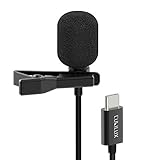
- [Driverless Plug & Play USB C Microphone] – No need for an extra power supply or driver, just snap the microphone and you can effortlessly record on the go and capture crystal sound with USB C smartphones, tablets or laptops.
- [Built-In ADC] – The built-in 48KHz/24-bit ADC ensures high-fidelity recording, resulting in a professional-grade sound with accurate detail and dynamic range.
- [Clear & Natural Sound] – Made with a high-sensitivity condenser, the Type C Microphone delivers a crystal-clean natural sound with ultra-low noise.
- [Multipurpose MIC] - Ideal for recording YouTube, TikTok, or Instagram videos, vlogging, livestreaming, singing, dictation etc.
- [Wide Compatibility] – Compatible with USB C and Thunderbolt 4/3 computers, and a wide range of USB C mobile devices, such as iPhone 17/16/15 series, iPad Pro 13/12.9/11, iPad Air 13/11, Galaxy S25/S24/S23 and Z Fold/Flip series, Galaxy Tab S11/S10/S9/S8, Pixel 10/9/8/7, and more.
Shopping ad

- USB C Headphones with Microphone for iPhone Duo,18 Pro,18 Pro Max,17 Pro Max,17 Pro,17,Air,17e,16e,16,16 Pro,16 Plus,16 Pro Max,15,15 Plus,15 Pro,15 Pro Max,for Samsung S26 S26+ S26 Ultra,S25 FE,S25,S25+,S25 Ultra,S24,for Google Pixel 11 Pro XL 10a 10,9a,9,8a,8,7a,7,Z Flip,Fold,S23 FE,S23,A17 A16,A26,A37 A36,A57 A56 A55 A53 A54,A33 A34 A35,S22,S21 FE,S21,S20,for Galaxy Tab,for OnePlus,for Macbook Pro,for iPad A16 10,Pro,Mini 6 7,Air 4 5 6,for Moto G Play 2026,for Nothing Phone,C audio device
- Secure Fit and Stereo Sound: Passive Noise Canceling In-ear design earbuds block the noise outside to achieve outstanding sound quality. The shape of the earbuds is unique and ergonomic, makes it a good looking accessories for your phone or other usb c devices, It will fits-nicely for long time comfortable wearing, Comes with 2 extra silicone tips S or L for your choices, NOTE: If the earbuds has No Sound when using on mobile, go to Setting-Developer Options, find Disable USB audio routing, Close this option
- Built-in Mic and Volume Control: Wired earphones with built-in mic and remote control allow you to answer or end call, play or pause song, skip next or previous song, adjust volume without picking up your phone while working out, driving a car, or on the go; Warm Tip: The default setting for audio Output and Input of some laptops or desktops are speaker, pls Go to Setting, find Sound, Input or Output, Select a Device for Sound Input or Output, then choose USB, to make the earbuds work
- Magnetic Design and Hands Free: This USB Type C Earphone allow you to wear it around neck when you take the earbuds off to prevent wire tangled; And you can always reach them easily when you need to put them on; Meanwhile, it comes with a carrying case to storage the earbuds, earbuds adapter or other small accessories, less mess in daily use; Warm tip: Put earbuds back to case when not using to avoid tangling, damages from moisture, dust, dirt, frequent bends, etc.
- Latest DAC Chip: Support digital input signals and converts standard resolution audio to ensure you can enjoy high fidelity lossless sounds quality; Warm tip: Try replacing the eartips to another pair that comes in the package if it is too tight or loose; And make sure you use the earbuds in an environment with good signal quality to avoid poor sound quality, signal interruption or noises during calls or listening; If you don't like in-ear design, try the other half in ear style without eartips
Shopping ad
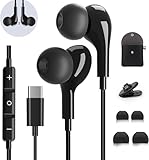
- 【Wide Compatibility】These Usb C earbuds wired work with all Type C devices without 3.5 mm jack, including Apple iPhone 15/15 Plus/15 Pro/16 Pro Max 17/ 17 Pro Max / 18 Pro Max,iPad 10 iPad Pro/Mini 6/Air,Samsung Galaxy Z Flip/Fold/Note,S26/S26+/S26 Ultr,S25/S25+/S25 Ultra,S24 FE/S24/S24+/S24 Ultra,S23 FE/S23/S23+/S23 Ultra,A57/A56/A55/A26/A35/A17/A16, S22/S22+/S22 Ultra,Pixel 10 9 8 Pro,One Plus 10T/10 Pro/9/Nord/8T/8/7T/7/6T,and headphones for android phone and tablets with type C audio
- 【Perfect Stereo Sound】AILZPXX USB C earbuds built-in high-quality DAC chip reduces the loss in the sound transfer. Delivers premium sound with fine-tuned acoustics that balance strong bass, soaring highs, and clear mids. In-ear design helps to minimize ambient noise for a more mellifluous experience. no buzzing, popping, or any bad audio issues, just plug and play to enjoy your favorite music.
- 【Magnetic Wired Earbuds】- Built-in robust magnet on the back of the earphones firmly binds the two HiFi earbuds together for comfortable wear around your neck when not in use, effortlessly roll up and carry it without becoming tangled in everyday usage. Furthermore, the ergonomically built and ultra-lightweight in-ear USB C audífonos fit the ear perfectly without causing any discomfort even when used all day, ideal for commuting, taking the bus, running, climbing, and other occasions.
- 【HD Mic & Volume Control】- Headphone with USB C jack have feature 3 button controller and a microphone, volume buttons and the main button can be used to answer/end calls, intelligent voice wake up, play/pause/next-track/previous-track/fast-forward.(Note: The Microphone is on the right side near near the cheek ) Warm Tip:the mic is incompatible for USB-C port device within 3.5mm jack.
- 【Satisfaction Guaranteed】USB C earbuds wired with microphone x1, Headphone carrying case x1, Headphone cable clip x1, 2 pairs of spare earphones (S/L code is in the box, M code is on the headphones, cater to different needs,For the replacement method, please refer to the small diagram.). If you have any questions after receiving the headset, please contact us anytime. We will actively deal with it and provide you with a satisfactory solution.
Shopping ad

- USB-C & USB-A COMPATIBILITY - This lavalier microphone for type c devices is compatible with iPhone 15/16/17 Series, MacBook Pro, Mac mini, Samsung Galaxy S24/23, and other smartphones or tablets with a USB C jack. Comes with a USB-C to USB-A adapter, it also works well with most laptop and desktop PCs, Mac, and other computers.
- CLEAR SOUND QUALITY - Built with a premium sound card (24-bit / 96kHz), this omnidirectional condenser microphone captures your voice with clarity and accuracy, while reducing unwanted background noise — ideal for interviewing, online conferencing, podcasting, vlogging, live streaming.
- PLUG & PLAY LAPEL MIC - This USB C lavalier microphone with USB-A connection is play-and-play, no extra cables or set-up. Just plug it into your device with USB-C or USB-A, it'll start working instantly. Without drivers and battery needed, it is friendly-design and easy to use.
- FLEXIBLE CLIP & 6.6FT CABLE - Featuring a sturdy metal clip, this USB-C lapel microphone can be securely attached to your clothing for optimal placement or discreet use. The 6.6FT / 2M soft silicone cable provides ample length and flexibility for comfortable movement during recording.
- ALL-IN-ONE PACKAGE & SUPPORT- Includes a USB-C microphone with clip and windscreen, cable tie, USB-C to USB-A adapter, and a premium storage pouch. Comes with 1-year protection and 24-hour customer support.
Product prices and availability are accurate as of the date/time indicated and are subject to change. Any price and availability information displayed on Amazon at the time of purchase will apply.
Independent reader supportYour contribution helps us test, update, and keep practical guides available for everyone.



