The Tool Desk
Outbyte Driver Updater FREEFix the driver behind crashes, sound loss and screen glitchesFind Drivers →Outbyte PC Repair FREEClear out junk files and repair common Windows errorsFree Scan →Samsung Mobile is reader-supported. When you buy through links on our site, we may earn an affiliate commission. As an Amazon Associate I earn from qualifying purchases. Learn more
Eleven Music is described as having an API used to build flexible music tools, and its stated capabilities include generating music, inpainting, reference matching, and embedding music. That establishes API-related use, but it does not establish whether Samsung Galaxy developers can sign up for direct API access, which endpoints or SDKs are available, or how to authenticate and make requests. Before planning an integration, check Eleven Music’s official page for current API documentation and availability.
What Is Confirmed About The API
Eleven Music’s published description says its API has helped build tools for both advanced producers and creators seeking a streamlined experience. It also describes the ability to generate, inpaint, reference-match, and embed music. These statements indicate API-powered workflows exist, but they do not spell out whether the API is separately available to outside developers or list a request format.
As an Amazon Associate I earn from qualifying purchases.
Free tools Windows power users keep installed
One-click scans. No signup required.
The same page says ElevenLabs provides generative audio models used for stem editing and full song creation through a partner relationship. That is context about how music tools are powered; it does not, by itself, confirm that an API customer can call stem-editing or full-song endpoints. Treat each capability as available for your integration only if current developer documentation explicitly describes it.
The announcement to get started with Music v2 across platforms does not identify which platforms, define API access, or confirm an Android SDK. Galaxy users should verify those details instead of assuming that an app, browser workflow, or mobile development library is included.
Shopping ad
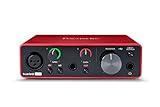
- Pro performance with great pre-amps - Achieve a brighter recording thanks to the high performing mic pre-amps of the Scarlett 3rd Gen. A switchable Air mode will add extra clarity to your acoustic instruments when recording with your Solo 3rd Gen
- Get the perfect guitar and vocal take with - With two high-headroom instrument inputs to plug in your guitar or bass so that they shine through. Capture your voice and instruments without any unwanted clipping or distortion thanks to our Gain Halos
- Studio quality recording for your music & podcasts - Achieve pro sounding recordings with Scarlett 3rd Gen’s high-performance converters enabling you to record and mix at up to 24-bit/192kHz. Your recordings will retain all of their sonic qualities
- Low-noise for crystal clear listening - 2 low-noise balanced outputs provide clean audio playback with 3rd Gen. Hear all the nuances of your tracks or music from Spotify, Apple & Amazon Music. Plug-in headphones for private listening in high-fidelity
- Everything in the box: Includes Pro Tools Intro+, Ableton Live Lite, Cubase LE, and Hitmaker Expansion: a suite of essential effects, powerful software instruments, and easy-to-use mastering tools
What Galaxy Developers Should Verify Before Building
For a Samsung Galaxy app, the key first question is where the music-generation work runs. The available statements do not specify whether requests are sent from a mobile client, a developer’s server, or another environment. They also do not provide authentication instructions, endpoint URLs, request or response formats, rate limits, latency expectations, supported audio formats, or pricing for API use. Check the vendor’s current documentation for each of these before estimating effort or committing to an architecture.
- Access: Confirm whether direct API access is offered to your account and whether access requires a particular subscription or approval.
- Integration details: Look for authentication, endpoint and SDK documentation, including any stated Android support. Do not infer these from the phrase “across our platforms.”
- Generation controls: Confirm the available prompt fields and whether your intended duration, structure, mood, genre, or other musical constraints are supported.
- Inpainting and references: Check what material can be edited or supplied as a reference, which formats are accepted, and how the service expects those inputs.
- Embedding and playback: Verify what “embed music anywhere” means for your use case, including delivery format, playback behavior, and any platform restrictions.
- Operational limits: Check current quotas, costs, processing time, and error handling with the provider. These details are not established by the available product statements.
A Practical Evaluation Workflow
- Write down the Galaxy use case. Decide whether the feature is meant to create a new track, revise a section of existing music, match a reference, or make generated music available inside another experience. Those map to the stated capabilities, but the exact API support still needs confirmation.
- Find the current developer instructions. Confirm account eligibility, credentials, supported platforms, input requirements, and output behavior. If the official materials do not answer a requirement, ask the vendor before implementing around an assumption.
- Prepare a narrow sample request. For example, an illustrative creative brief could read: “Create an original 30-second instrumental cue for a calm evening reading screen, with a gentle pulse and a clear ending.” This is a prompt-writing example, not a claim that Eleven Music supports a 30-second limit, instrument selection, or any particular genre.
- Evaluate revisions separately. If the workflow needs an edit, document the intended change in plain language and check whether the documented inpainting feature accepts that kind of instruction and source material. For reference matching, verify what reference inputs are allowed before using a recording.
- Test delivery in the intended Galaxy experience. Once access and output formats are established, assess playback, loading, and failure behavior on the device and Android versions you plan to support. No specific Galaxy compatibility or performance result is stated here.
Prompt And Music Decisions That Need Confirmation
A useful music request describes the job the audio must do: where it will be heard, how long it should feel, whether it needs a clean ending, and what emotional intensity fits the screen or activity. Those are practical brief-writing choices, not confirmed Eleven Music prompt parameters. Keep the first brief simple, then add constraints only after the API documentation confirms that they can be expressed and honored.
Quick wins for a faster PC:
Scan for outdated or missing drivers - takes under a minuteDriver Scan →Clear out junk files and repair common Windows errorsFree Scan →Fix the driver behind crashes, sound loss and screen glitchesFind Drivers →Shopping ad

- The new generation of the songwriter's interface: Plug in your mic and guitar and let Scarlett Solo 4th Gen bring big studio sound to wherever you make music
- Studio-quality sound: With a huge 120dB dynamic range, the newest generation of Scarlett uses the same converters as Focusrite’s flagship interfaces, found in the world's biggest studios
- Find your signature sound: Scarlett 4th Gen's improved Air mode lifts vocals and guitars to the front of the mix, adding musical presence and rich harmonic drive to your recordings
- All you need to record, mix and master your music: Includes industry-leading recording software and a full collection of record-making plugins
- Everything in the box: Includes Pro Tools Intro+, Ableton Live Lite, Cubase LE, and Hitmaker Expansion: a suite of essential effects, powerful software instruments, and easy-to-use mastering tools
For a reference-based workflow, distinguish between “use this as a broad creative reference” and “reproduce this recording.” The product statements confirm reference matching as a capability, but do not define the permitted inputs, degree of similarity, or safeguards. Do not assume that an uploaded recording, a recognizable voice, or a cover request is supported or permitted.
Commercial Use And Rights
Eleven Music says generated tracks are cleared for broad commercial use, while also stating that commercial rights vary by subscription tier and directing users to its Terms. That means a Galaxy app’s intended use should be checked against the terms for the actual account and tier; “broad” does not mean every use is covered. The available statements do not specify API-tier rights or settle rights for references, voices, covers, or samples. Get consent for material and voices you supply, and check ElevenLabs’ terms for the applicable permissions before release.
Shopping ad
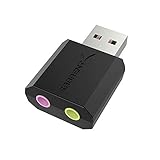
- PLUG IN AND HEAR SOUND IN SECONDS - USB Type-A connector with a 3.5mm stereo headphone output and a separate 3.5mm mono microphone input. No drivers, no software, no external power - the adapter is USB bus-powered and is recognized as a standard USB audio device.
- WORKS ON WINDOWS, MAC AND LINUX - Driverless on Windows 98SE/ME/2000/XP/Server 2003/Vista/7/8, Linux and Mac OSX, and compliant with the USB Audio Device Class 1.0 specification, so any system that supports class-compliant USB audio will see it. Select it as the sound output and input device after plugging it in.
- TWO JACKS, TWO JOBS - The green jack is stereo OUT for headphones or powered speakers; the pink jack is mono microphone IN for a 3.5mm mic. It does NOT support 4-pole headsets on a single combo plug, it does NOT power passive speakers, and it does NOT add surround sound - it is a stereo 2-channel adapter.
- FOR LAPTOPS AND DESKTOPS THAT NEED AN AUDIO PORT BACK - Adds a headphone and mic port to a laptop, desktop, or mini PC whose onboard jack has failed or was never there. Managed and work-issued computers can block new USB audio devices by policy - check with your IT department before ordering for a company machine.
- SABRENT SUPPORT AND WARRANTY - What is in the box: one USB audio sound adapter. Backed by a 1-year limited warranty, extended to 2 years when you register within 90 days on the manufacturer's website.
What This Means For A Galaxy Project
Eleven Music is relevant to an integration concept because its published page identifies API-powered music tooling and names generation, inpainting, reference matching, and embedding. The evidence does not settle public API availability, direct Galaxy or Android support, implementation details, or the limits of each capability. A developer can use those named functions to frame questions and a prototype brief, then base a build decision on current official API documentation and account-specific terms.
Quick Recap
Shopping ad

- The new generation of the artist's interface: Connect your mic to Scarlett's 4th Gen mic pres. Plug in your guitar. Fire up the included software. Start making your first big hit
- Studio-quality sound: With a huge 120dB dynamic range, the newest generation of Scarlett uses the same converters as Focusrite’s flagship interfaces, found in the world's biggest studios
- Never lose a great take: Scarlett 4th Gen's Auto Gain sets the perfect level for your mic or guitar, and Clip Safe prevents clipping, so you can focus on the music
- Find your signature sound: Air mode lifts vocals and guitars to the front of the mix, adding musical presence and rich harmonic drive to your recordings
- With Scarlett 4th Gen, you have all you need to record, mix and master your music: Includes industry-leading recording software and a full collection of record-making plugins
Shopping ad

- Podcast, Record, Live Stream, This Portable Audio Interface Covers it All - USB sound card for Mac or PC delivers 48kHz audio resolution for pristine recording every time
- Be ready for anything with this versatile M-AUDIO interface - Record guitar, vocals or line input signals with two combo XLR / Line / Instrument Inputs with phantom power
- Everything you Demand from an Audio Interface for Fuss-Free Monitoring - 1/4" headphone output and stereo 1/4" outputs for total monitoring flexibility; USB/Direct switch for zero latency monitoring
- Get the best out of your Microphones - M-Track Duo’s transparent Crystal Preamps guarantee optimal sound from all your microphones including condenser mics
- The MPC Production Experience - Includes MPC Beats Software complete with the essential production tools from Akai Professional
Product prices and availability are accurate as of the date/time indicated and are subject to change. Any price and availability information displayed on Amazon at the time of purchase will apply.