Samsung Mobile is reader-supported. When you buy through links on our site, we may earn an affiliate commission. As an Amazon Associate I earn from qualifying purchases. Learn more
Music teachers can use AI music tools to make a chord progression, melody, lyric draft, or complete song into a lesson prompt: students listen, describe what they hear, then revise or perform their own version. On a Samsung Galaxy phone, Song Cage and Suno have listed Android availability; Songcraft and LandChords are web tools, so check their browser requirements before planning a lesson around them.
Choose A Lesson Goal Before Opening A Tool
Pick one musical skill students can demonstrate by the end of class. AI output is useful as material to question and change, rather than as an answer students must accept. For example, ask students to identify a repeated chord pattern, compare two melodic contours, or explain how changing a lyric affects a phrase.
As an Amazon Associate I earn from qualifying purchases.
- Harmony: Have students listen for a progression and describe where it repeats or changes.
- Melody: Ask students to compare a short melodic idea with their own alternative.
- Song structure: Let students mark sections they hear, then discuss what makes them sound different.
- Lyric writing: Use a draft as a starting point for examining syllables, rhyme, and meaning.
Prepare The Galaxy Phone And Lesson Material
- Choose a tool whose listed functions fit the goal. Song Cage combines chords, melody, lyrics, arrangement, playback, and recording, and lists Android support. Suno generates songs with vocals, lyrics, instrumentation, and production, and is available on Android. Songcraft offers lyrics, chords, tabs, keys, recordings, and collaboration through the web. LandChords offers AI lyrics, chords, melody playback, recording, and drums through the web.
- Open the tool on the Galaxy phone and confirm that the functions you need are available in your account and browser or app. The entries do not establish compatibility with a particular Galaxy model, classroom network, or school account.
- Write a short, skill-focused instruction. For example: “Create a short song idea with a clear repeating chord progression and a melody that changes in the later section. Keep the arrangement simple enough for students to describe by ear.” Treat this as a prompt to try, not a guaranteed output format or result.
- Prepare a student task before generating anything: what to listen for, what to write down, and what students will alter or perform. Keep any student names, recordings, and personal details out of prompts unless you have the necessary consent and have checked the platform’s terms.
Run A Lesson With Song Cage
Build A Chord And Melody Listening Example
On the Galaxy phone, use Song Cage’s songwriting workspace to put together a short example involving chords and melody. Its listed playback and recording support can help you present the material; the entry does not establish notation display or a particular instrument sound, so check the tool before making either part of the lesson.
- Set the listening task first: ask students to mark where the harmony repeats and whether the melody repeats, rises, falls, or changes direction.
- Play the example, then give students time to describe what they noticed before you explain your own interpretation.
- Ask pairs to propose one change to the melody or chord sequence. Have them explain how the change affects the sound or mood they hear.
- Use the workspace’s recording capability if you want students to capture their own idea. Check the available recording workflow and sharing controls in the product before class.
Turn The Example Into A Revision Exercise
Song Cage combines lyrics and arrangement with chords and melody. Ask students to revise a line or musical part while keeping one feature unchanged, such as the repeated chord pattern. This makes the musical decision visible: students can say what they kept, what they changed, and why. Do not promise PDF or MIDI handouts from the Free plan; those exports require a paid plan.
Shopping ad

- Introducing Scribbledo FLEXIC – Our newest collection of flexible dry-erase sheets offers the same high-quality surface as our traditional boards but with added flexibility. These sheets are designed to be more affordable, lightweight, and space-saving, perfect for classrooms, homes, or on-the-go learning without the bulk of standard boards.
- 🎵 Enhanced Practice: Each sheet measures 11x14 inches, offering ample space for comfortable keyboard practice. The keyboard layout depicts standard keys, ensuring learners can familiarize themselves with key positioning. This size is large enough to provide a realistic experience, yet compact enough to fit comfortably on any desk or music classroom setting.
- ✍️ Dry Erase Surface: Designed with a smooth dry erase surface, these sheets allow for easy writing and erasing, enabling repeated use without the mess or waste associated with traditional paper sheets. The high-quality surface ensures that marks can be easily wiped away, encouraging continual practice and reinforcing muscle memory. Add the music staff whiteboard to your music classroom supplies.
- 🎓 Music Learning Tool: Ideal for a variety of settings, these practice sheets are perfect for classrooms, home offices, training centers, and corporate environments. They can be used to teach beginners, improve student typing speed and accuracy, or conduct typing workshops. The ability to easily wipe clean and start anew allows for custom exercises tailored to specific learning goals, making these sheets a flexible solution for all typing skill levels.
- 🏃 Portable and Convenient: These musical sheets are not only practical but also highly portable, making them convenient for musicians on-the-go practice. Incorporating these dry erase keyboard practice sheets into your routine provides a sustainable, interactive, and engaging way to master keyboard skills, promoting continuous improvement and learning.
Use Suno For Listening And Arrangement Discussion
Suno can generate complete songs with vocals, lyrics, instrumentation, and production, and its listed editing functions include remixing, extensions, and section replacement. That makes it suitable for a listening comparison when students are studying how sections or arrangement choices differ. It does not establish a classroom mode, notation, or instrument-specific teaching feature.
- On the Galaxy phone, ask Suno for a song idea with a clear contrast between two sections. Keep the prompt focused on the distinction students will listen for, such as a change in instrumentation or energy; do not assume a specific genre or instrument will be produced reliably.
- Play the result and ask students to identify the section boundary and describe the audible change using their own musical vocabulary.
- If the available editing controls allow it, use section replacement or an extension to make a second version for comparison. Confirm the current controls in Suno before building the activity around them.
- Ask students to create or perform their own contrasting section, then compare their choices with the generated example.
Suno’s Free Plan does not include commercial rights or stem separation. For use of voices, covers, samples, or student-created recordings, obtain appropriate consent and check the platform’s current terms; the available information does not settle rights for every classroom use.
Do these 3 things before closing this tab:
1Clear out junk files and repair common Windows errors2Fix the driver behind crashes, sound loss and screen glitches3Repair Windows errors before they cause bigger problemsShopping ad

- ✨ HIGH QUALITY: Our reusable double-sided music staff dry erase lap boards are made of high-quality Masonite material, making them lightweight but durable, and these music dry erase boards are sturdy enough to use on your lap or forearm.
- 🎯 BEST MUSIC LEARNING TOOL: These dry erase music white boards are great for musicians, music classroom supplies, bands, music teachers and students, and it’s an excellent instructional tool for teaching students how to read music and keyboard notes.
- 💊 DOUBLE SIDED LAP BOARD: Our reusable music staff dry erase lapboards are double-sided, it has an imprint of a piano keyboard and 2 music staff lines on the front side, and a blank dry erase writing surface on the reverse side.
- 🎹 PIANO KEYBOARD IMPRINT: These lapboards have an imprint of a piano keyboard on it so the instructor can write the musical notes on the top staff lines, write the corresponding letter codes on the second music lines and label the keys on the keyboard.
- 🌏 SAVE THE PLANET: These music staff dry erase boards for students are reusable, allowing musicians, bands, music teachers and students to use them over and over to save money & the planet and be more environmentally friendly.
Use Songcraft Or LandChords For A Lyric And Chord Workshop
Songcraft For Collaborative Writing
Songcraft is a web songwriting workspace with real-time collaboration across lyrics, chords, tabs, keys, and recordings. Its listed tools include syllable counting, chord suggestions, and transposition. On a Galaxy phone, access it through a browser and check the interface and collaboration setup before assigning group work; the entry does not promise a particular mobile layout.
- Give students a simple theme and ask them to draft a short lyric with a clear syllable pattern.
- Use the syllable counting and rhyme tools to inspect the draft, then have students revise it in their own words.
- Place chords with the lyrics and discuss whether a chord change supports or interrupts the phrase.
- Use transposition as a discussion or revision option if it fits the lesson, and confirm the available controls before class.
LandChords For Chords, Melody, And Lyrics Together
LandChords combines AI lyrics, chord anchoring, melody playback, recording, and drum creation in a web workspace. Its Free plan is limited to two songs and seven sections, and WAV and MIDI export require Pro. The entry does not establish notation or a particular curriculum alignment.
Shopping ad

- 49 key keyboard piano: compact electric keyboard for kids and beginners learning at home.
- Ready out of the box: power supply and sheet music stand included for immediate practice.
- Learn faster: keynote stickers and Simply Piano lessons guide new players note by note.
- Sounds and rhythms: built-in tones, beats and demo songs keep practice engaging.
- Compact and portable: fits bedrooms, classrooms and family spaces with easy setup.
- Ask students to draft a short lyric for a specific classroom topic or feeling, then select a phrase to set to music.
- Use chord anchoring and melody playback to explore how the phrase sounds over the chosen harmony.
- Invite students to suggest one change to the lyric rhythm, chord placement, or melody, and explain the effect they expect to hear.
- Use recording or drum creation only if those controls suit the lesson and are available in the account you plan to use.
Close With Student Decisions, Not A Tool Rating
End the activity with evidence students can explain: a marked section change, a revised lyric, a changed chord or melody, or a short performance. Ask each student to name one musical choice they made and what they heard after making it. Before sharing recordings or generated songs beyond class, check the platform terms and obtain consent from anyone whose voice or performance is included.
Quick Recap
Shopping ad
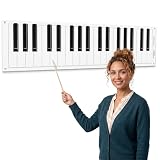
- Dry Erase Piano Keyboard Laminated Poster: our piano keyboard poster offers a stylish 61 inch roll of black and white piano key design, suitable for adding a musical touch to bulletin boards, classrooms, offices, or party decorations
- Durable and Long-lasting: this dry erase piano keyboard laminated poster is made to withstand frequent use, making it a great choice for music-themed events, school music rooms, or anywhere a piano-inspired look is desired
- Easy to Clean: it is a breeze for you to clean this music dry erase board; Just wiping with a whiteboard eraser can remove most of the handwriting, and you can wipe dry handwriting with a piece of wet cloth conveniently, saving time and energy
- Versatile Decoration: ideal for a variety of settings, nice for music classrooms, private studios, and homeschool settings; Ideal for teachers demonstrating scales and chords; Great for one-on-one lessons to visualize fingering and music theory; Useful for people as a silent practice pad or for songwriters mapping out compositions; A durable, reusable tool for all ages
- Music Lovers Gift: this large dry erase musical staff poster set is perfect for recording scales or creating your own music; It's also a practical gift for music teachers and students to learn basic notes and music theory; Designed for music enthusiasts, this piano keyboard border trim is an excellent way to celebrate a love of music, making it a great decoration for birthdays, graduations, or any occasion that calls for a melodic theme
Shopping ad

- 【Strong Magnetic Backing for Secure Mounting】Our dry-erase music staff whiteboard and piano keyboard sheets feature a powerful magnetic backing that attaches firmly to any metal or magnetic surface, including classroom whiteboards, metal shelves, and lockers. It attaches easily and securely - no sliding or falling off during use.
- 【Complete Music Kit】Includes 1 x Magnetic Music Staff Whiteboard, 1 x Piano Keyboard Diagram, 4 x Dry-Erase Markers (Black, Blue, Red, Green), and 1 x Whiteboard Eraser. Everything you need for engaging music lessons, right out of the box.
- 【Essential Music Teaching Aid】Whether you are teaching piano, music theory, or composition, this large music staff whiteboard is a a must-have for classrooms, studios, and home practice. It's a thoughtful and practical gift for music educators and aspiring musicians alike.
- 【Extra-Large & Reusable Music Staff】The oversized "Grand Staff" provides ample space for writing scales, composing melodies, or teaching music theory. Coated with a smooth Nano surface, it easily wipes clean without stains or ghosting, allowing endless reuse —eliminating the need for paper staff paper or hand-drawn lines.
- 【Easy to Clean and Built to Last】Music staff whiteboard crafted from high-quality magnetic materials and durable PET, this board resists tearing and wear. Most ink wipes away instantly with included eraser, while stubborn marks clean up easily with a damp cloth — saving you time and effort after every class.
Product prices and availability are accurate as of the date/time indicated and are subject to change. Any price and availability information displayed on Amazon at the time of purchase will apply.
Free tools Windows power users keep installed
One-click scans. No signup required.




