- Home
- Minecraft Shape Generators
- Block Round

Block Round
What it is
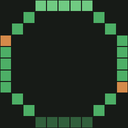
Block Round is a browser-based tool for creating circles, ellipses, spheres and ellipsoids with Minecraft block textures. Its 2D modes offer Euclidean, Bresenham and Threshold algorithms, while sphere and ellipsoid modes support X, Y and 45-degree diagonal cuts. A 3D preview helps view the shapes. Users can choose blocks such as Grass Block, Dirt, Stone, Oak, Diamond, Sand and Gravel, or select a random mix. The tool exports 2D figures as PNG files and 3D figures as Sponge schematic v2 files, which can be imported by WorldEdit, Litematica and MCEdit. It runs in a web browser without installation, an account or a backend, and the README says it works offline as a PWA. Settings are session-only and return to defaults after a reload. A technical math companion is available in nine languages, with each PDF described as at least 25 pages. The project states that its code, layout, design system and sound engine are All Rights Reserved, and that it is not affiliated with Mojang Studios or Microsoft.
For and against
For
- Creates four geometric shapes with Minecraft textures.
- Offers three algorithms for 2D figures.
- Exports 2D figures as PNG files.
- Exports 3D figures as Sponge schematic v2 files.
- Works offline as a PWA.
Against
- Settings reset to defaults after a reload.
- 3D exports are Sponge schematic v2 files.
- Project code and design are All Rights Reserved.
The verdict
Block Round combines geometric shape creation, block selection and multiple export formats in a browser-based tool. Its session-only settings are worth noting if you want to keep preferences between visits.
Who it suits
Block Round suits Minecraft builders who want to create textured geometric figures in a browser and export them as images or schematics. It may also fit users who need a tool that works offline and do not need settings to persist across visits.
Plans and prices
Free plan
Free to use for the core job; no paid tier required
Read 7 Oct 2026 · itechguides.com
On the record
- 2D algorithms
- The available 2D algorithms are Euclidean, Bresenham, and Threshold.github.com · read 7 Oct 2026
- 3D cuts
- Sphere and ellipsoid modes support X, Y and 45-degree diagonal cuts.github.com · read 7 Oct 2026
- Access
- The README describes it as browser-based, requiring no installation, account or backend.github.com · read 7 Oct 2026
- Algorithms
- Its 2D modes offer Euclidean, Bresenham and Threshold algorithms.github.com · read 7 Oct 2026
- Block choices
- Users can select Minecraft blocks including Grass Block, Dirt, Stone, Oak, Diamond, Sand and Gravel, along with a Random mix and other blocks.github.com · read 7 Oct 2026
- Block picker
- The block picker includes Minecraft blocks such as Grass Block, Dirt, Stone, Oak, Diamond, Sand, and Gravel, as well as Random mix.github.com · read 7 Oct 2026
- Documentation
- A technical math companion is available in nine languages, with each PDF described as at least 25 pages.github.com · read 7 Oct 2026
- Exports
- It exports 2D figures as PNG and 3D figures as Sponge schematic v2 files.github.com · read 7 Oct 2026
- Image export
- The README states that 2D figures can be exported as PNG files.github.com · read 7 Oct 2026
- Integrations
- The exported schematic can be imported by WorldEdit, Litematica and MCEdit.github.com · read 7 Oct 2026
- License
- The README states that the code, layout, design system and sound engine are All Rights Reserved.github.com · read 7 Oct 2026
- Minecraft disclaimer
- The project says it is not affiliated with, endorsed by or sponsored by Mojang Studios or Microsoft.github.com · read 7 Oct 2026
- Offline use
- The README says the app works offline as a PWA.github.com · read 7 Oct 2026
- Persistence limit
- Settings are session-only and reset to defaults after reload.github.com · read 7 Oct 2026
- Privacy architecture
- The README describes the app as having no backend.github.com · read 7 Oct 2026
- Purpose
- Block Round generates circles, ellipses, spheres and ellipsoids rendered with Minecraft block textures.github.com · read 7 Oct 2026
- Schematic export
- The tool exports Sponge schematic v2 files that the README says WorldEdit, Litematica, and MCEdit can import.github.com · read 7 Oct 2026
- Settings persistence
- Settings are not saved across reloads; each visit starts with the defaults.github.com · read 7 Oct 2026
The review
Block Round is a free web generator for Minecraft-textured geometric forms, covering both flat and three-dimensional builds. It suits builders who need controllable circles, ellipses, spheres or ellipsoids and want files they can move into Minecraft editing tools. Its broad export choices and offline-capable delivery make it a strong one-off utility, while reset-on-reload settings make it less comfortable for repeat production.
Overview
Block Round turns four shape types—circle, ellipse, sphere and ellipsoid—into block-based designs using Minecraft materials. A 3D preview helps inspect volumetric forms before export, so the tool can serve both as a visual planning aid and as a bridge to a build workflow. Two-dimensional figures export as PNG files, while three-dimensional figures export as Sponge schematic v2 files. Those schematics can be imported into WorldEdit, Litematica and MCEdit, giving experienced builders a direct route from browser generation to established editing environments.
The app runs as a browser-based tool with no installation, account or backend. It is also described as working offline as a progressive web app, which is useful for planning away from a constant connection and avoids account administration. The trade-off is that settings are session-only: reloading restores defaults. That is inconsequential for an occasional shape, but costly when iterating on a recurring material palette or algorithm choice.
Key features
- Algorithm choices for 2D forms: Circle and ellipse modes provide Euclidean, Bresenham and Threshold algorithms. Builders can compare different rasterized edge treatments and choose the result that best fits a particular block layout instead of accepting one fixed method.
- Direct Minecraft block selection: The picker includes Grass Block, Dirt, Stone, Oak, Diamond, Sand and Gravel, along with a Random mix and other blocks. Material selection is built into generation, reducing the need to recolor a finished image in another application.
- Cut controls for 3D shapes: Sphere and ellipsoid modes support X, Y and 45-degree diagonal cuts. These options are valuable when a complete solid is not the desired build and when a builder needs a specific viewing or construction slice.
- 3D inspection: A three-dimensional preview lets users assess the generated volume before producing a schematic, making it easier to catch an unsuitable cut or silhouette before import.
- Two export paths: PNG output fits 2D reference images and sharing, while Sponge schematic v2 output is suited to Minecraft editor workflows. The split reflects different practical destinations rather than forcing every result into one file type.
- Lightweight delivery: The project uses a single static HTML file with vanilla JavaScript, Canvas 2D and three.js, without a framework or build step. That architecture supports its installation-free, no-backend model, though it does not provide persistent project settings.
Pricing
Block Round has one Free plan at no cost. It covers the core generator, including its shape modes, block choices, previews and PNG or Sponge schematic exports, with no paid tier required. This is the right fit for hobby builders, occasional planners and anyone evaluating a shape before committing materials. There is no lower-cost restricted tier to compare and no paid upgrade that trades the session-reset limitation for saved preferences, so repeat users must decide whether reconfiguring each visit is acceptable.
Platforms
Block Round is available on the web. It requires no installation, account or backend and can operate offline as a PWA, making it practical on a browser-capable desktop or mobile device when local connectivity is limited.
Who it's for
This is a good choice for Minecraft builders who need mathematically shaped block layouts, want to choose materials during generation and already use WorldEdit, Litematica or MCEdit. It also fits users who need a PNG reference for a 2D design or a Sponge schematic for a 3D build. It is less suitable for teams or long-running projects that depend on saved presets, because every reload returns to default settings. The nine-language technical math companion, with each PDF described as at least 25 pages, will appeal to readers who want deeper background on the generation methods rather than only a visual result.
Pros and cons
Pros
- Useful shape coverage: Circles, ellipses, spheres and ellipsoids cover common rounded forms in both 2D and 3D.
- Practical Minecraft exports: PNG and Sponge schematic v2 address reference-image and editor-import workflows separately.
- Algorithm and material control: Three 2D algorithms and a broad block picker allow meaningful variation in edge treatment and appearance.
- Low-friction access: No account, installation or backend is required, and offline PWA operation supports disconnected use.
Cons
- Settings do not persist: Reloading resets choices, adding repetitive setup to iterative projects.
- Focused geometry rather than a general modeler: The documented shape set centers on circles, ellipses, spheres and ellipsoids, so builders seeking other primitives need another tool.
- Protected project assets: The code, layout, design system and sound engine are All Rights Reserved, limiting reuse under an open license.
Alternatives
Pick Mcgic Circle Generator instead when you need Android or iOS access, circle sizes up to 512 × 512 blocks and full-block output. Choose Minecraft Plot if you want a broader freemium service with mobile platforms, basic tools on its free plan and an optional $4.99 30-day premium membership.
Ghostern Minecraft Sphere Generator is a free Android, iOS and web option when sphere generation across devices is the priority. Block Shape Generator is the better fit for controls that include sphere, cone, dome and cylinder shapes.
Choose SchemForge Sphere Generator for a daily free build with interactive 3D preview and private history, or its 48-hour unlimited option when a short burst of unrestricted use matters. Astroworld Circle & Dome Generator favors no-sign-up, no-ad use with diameters from 1 to 256 blocks.
BlockBlend is preferable for unlimited palettes, all-block access, WorldEdit export and community sharing. Choose CartoVoxel Minecraft Shape Maker when 11 shapes, live 3D and layer views, and JSON, layer-guide or Java mcfunction exports are more important than Block Round’s focused geometry set. For a wider survey, see Minecraft Shape Generators.
Verdict
Block Round is a strong recommendation for Minecraft builders who need rounded geometric forms, selectable block textures and exports that move cleanly into common schematic editors. Its free, accountless and offline-capable workflow is the main reason to choose it. Look elsewhere if saved settings, broader primitive coverage, mobile-first access or project history are central to your workflow.