- Home
- AI Photo Colorization Software
- Colorize Photo

Colorize Photo
What it is
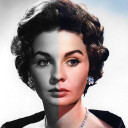
Colorize Photo is a free web tool for adding color to black-and-white pictures. Its Auto mode uses an on-device neural network based on the ECCV 2016 “Colorful Image Colorization” model; the model downloads once at about 39 MB. You can choose among eight tonal palettes and use a manual brush for touch-ups. The tool accepts JPG, PNG, WebP, and other formats your browser can open, and it can process multiple photos in a batch for a combined download. Exports are available as JPEG, PNG, or WebP, with adjustable quality and size. The longest side can be up to 4096 px, and each photo has 15 undo steps. Clipboard paste and copying the result as a PNG are also supported. Processing runs locally in the browser using Canvas API and WebAssembly. The maker says photos are not uploaded, stored, or tracked. The free plan requires no signup or installation, adds no watermark, and has no photo-count limit.
For and against
For
- Free plan has no signup or watermark.
- Processes any number of photos in batches.
- Eight palettes and a manual brush are available.
- Supports JPEG, PNG, and WebP exports.
- Browser-based processing; maker says photos are not uploaded.
Against
- Maximum resolution is 4096 px on the longest side.
- Auto mode downloads a model of about 39 MB.
- Available as a web tool.
The verdict
Colorize Photo combines automatic colorization with palette choices, brush touch-ups, and batch downloads. Its browser-based workflow and stated privacy approach may appeal to users who prefer not to install an app.
Who it suits
It suits people who want to colorize photos in a browser without installing software. Its batch processing and palette and brush options may help when working with multiple images or making touch-ups.
Plans and prices
Free
No signup · no watermark · no limit on number of photos
Read 3 Oct 2026 · colorize-photo.com
On the record
- Batch processing
- Users can process any number of photos and download the batch together.colorize-photo.com · read 3 Oct 2026
- Clipboard
- Users can paste images from the clipboard and copy the colorized result as a PNG.colorize-photo.com · read 3 Oct 2026
- Colorization
- Auto mode predicts natural colors using the ECCV 2016 “Colorful Image Colorization” model, which downloads once at about 39 MB.colorize-photo.com · read 3 Oct 2026
- Export
- It exports JPEG, PNG, or WebP with adjustable quality and size controls.colorize-photo.com · read 3 Oct 2026
- Input formats
- It accepts JPG, PNG, WebP, and other image formats the browser can open.colorize-photo.com · read 3 Oct 2026
- Installation
- The maker says the tool runs in the browser and requires no installation.colorize-photo.com · read 3 Oct 2026
- Pricing
- The maker describes the tool as free, with no signup, watermark, or limit on the number of photos.colorize-photo.com · read 3 Oct 2026
- Privacy
- Processing runs in the browser using Canvas API and WebAssembly, and the maker says photos are not uploaded, stored, or tracked.colorize-photo.com · read 3 Oct 2026
- Purpose
- Colorize Photo adds color to black and white pictures using an on-device neural colorization network.colorize-photo.com · read 3 Oct 2026
- Resolution
- The maximum resolution is 4096 px on the longest side.colorize-photo.com · read 3 Oct 2026
- Styles and brush
- It offers eight tonal palettes and a manual color brush for touch-ups.colorize-photo.com · read 3 Oct 2026
- Undo
- The tool provides 15 undo steps per photo.colorize-photo.com · read 3 Oct 2026